Webcam-Based Motion Capture
An experiment on using computer vision for the future of human-computer interaction.
As long as there are people who believe they're “not good at technology,” then technology is not good enough. I'm fascinated by the possibilities in human-computer interaction. I don't foresee a future dominated by the 6-inch phone screens and 15-inch computer screens of today.
Every project on this page was developed using Google's open source MediaPipe package. I used Claude Code as my primary implementation partner, focusing my efforts on design decisions, iteration, and Unity asset work.
Project 1: Simple Tracking
The first question I had was whether computer vision could track me. To do this, I used MediaPipe's pose segmentation, which identifies and tracks points of interest on detected humans (including shoulders, hands, nose, hips, etc.). I tasked it with following my nose, positioning a blue circle over it. While this is a simple interaction, it was my first time using MediaPipe and was a good learning opportunity for both me and Claude.
Project 2: Tracking Eyes
My next goal was to see if I could make a character that realistically seemed to look at me as I walked around. I started with the eyes, because that's the part of a 2D character that would move if this were to work.
The test “worked” in that the eyes successfully follow me around, but the eyes are incredibly unsettling. Also, the tracking rate isn't perfect which keeps it from being convincing. Rather than trying to go deeper, I decided to shelve it for a time when I was more prepared to get the graphics right.
Project 3: Catching Snow
Next, I wanted to test a different mechanic—controlling the computer not just by where you're standing, but also what you're doing. This was also technologically different, because it used image segmentation rather than pose segmentation. Basically, instead of tracking discrete points on a person (nose, wrists, shoulders, hips) and creating a “skeleton” of them, it separated the human from the rest of the image. This captures the player's entire body, but does not give you any information about what they're doing.
For my experiment, I built a game that I've seen done before in museums (using much more expensive equipment): falling particles that you can block with your arms. In museums, you are often “catching” these particles to drop later, but since I wasn't trying to experiment with particle system mechanics I skipped that functionality.
What I learned from this is that MediaPipe's image segmentation technology wasn't as stable as pose segmentation. There was considerable jitter on the detected human shape, often dropping the arms or including background materials (like my couch). It also struggled with children (I was letting my kids play with it) and didn't do well with uncommon poses. I was able to partially solve these problems by averaging over frames, increasing the image resolution, and changing the required confidence intervals, but it still wasn't perfect and I decided to focus on pose segmentation going forward.
Project 4: Creature Interaction
Next, I wanted to control a game using pose segmentation. I had Claude write a narrative about a cute creature that is shy but, as the player shows non-threatening behavior, becomes friendly and playful. I also asked Claude to handle the graphic representation of this creature for me. This was the result:

This is not the result of Claude's image-generation capabilities, but rather a creature built from code in Python. The game itself worked, but was so graphically unappealing that I couldn't stomach it. I realized that I was hitting a ceiling in how immersive these experiences could become, and the way to break through that ceiling was to move to a proper game engine.
Project 5: Simple Tracking in Unity
To improve the quality of graphics I was using (and the immersiveness of the experiences), I transitioned from pure code to Unity. I had some experience with Unity from a mixed-reality development class I took in college, and I had also taken an animation class where I learned Maya, and that knowledge transferred pretty well. I also did several tutorials in Unity to make sure I was confident with it.
I found an open-source MediaPipe Unity plugin, and I used it to recreate my first experiment—tracking my nose with a blue circle—as a “Hello World”-type project to ensure my setup worked. This was, once again, difficult to pull off but unimpressive to use, but it was necessary to build knowledge for subsequent projects.
Project 6: Face Tracker
My second Unity project was a copy of my second non-Unity project (Tracking Eyes), but with better graphics. I used existing assets to create a scene, put a character in it, gave the character an “idle” animation so that it looked reasonably alive, and then set it up to track a user's face so that it appears to look at them. Because of the previous work I'd done, Claude had plenty of reference material and this was fairly straightforward. The most time spent on it was fine-tuning the movement to feel realistic.
Project 7: Body Mirror
Now that I was working with an entire animated character, rather than a creepy pair of eyes, I wanted to see if I could get the character to mirror my movement. I didn't give the character any translational movement, just movement of the arms/legs.
Surprisingly, this was by far the most difficult one for Claude. It struggled to get the math right, switching left/right and forwards/backwards multiple times in almost every instance. There were many times when it came up with a plan, felt confident that it would work, and then the result was unchanged from before. Eventually we got it most of the way there, but I felt like it was time to move on before it was perfect.
Project 8: Pose-Triggered Effects
Because I couldn't get the character in Project 7 to look natural, I wanted to experiment with having players control the environment rather than the character. Claude and I came up with a list of poses/actions that were visually distinct enough to be separate triggers, and then we came up with effects to match those poses/actions. Here's the list we came up with:
| Number | Gesture | Type | Effect |
|---|---|---|---|
| 1 | Both wrists above nose | Static Hold | Fireworks |
| 2 | T-Pose (arms at shoulder height) | Static Hold | Wind/leaves |
| 3 | Cross wrists at chest → throw arms down-out | Static Hold | Ice blast |
| 4 | Fast punch | Velocity | Fire burst |
| 5 | Both arms in wide V above shoulders | Static Hold | Golden sparkles |
| 6 | One hand up, one hand down | Static Hold | Lightning |
| 7 | Torso lean forward | Static Hold | Rain |
Claude wrote the code to detect those gestures and trigger each of those effects, and I built the effects in Unity. I also added in a character, and gave it triggers to react whenever one of those effects went off.
I found that this was mostly successful, but required a fair amount of tweaking. Because I'm using a single webcam, I can't rely on parallax or LiDAR for accurate depth perception and the “torso lean forward” effect was tricky to pick up on visually. I also couldn't get the “fast punch” at a speed where it detected punches and only punches, and I eventually removed it.
Project 9: Updraft
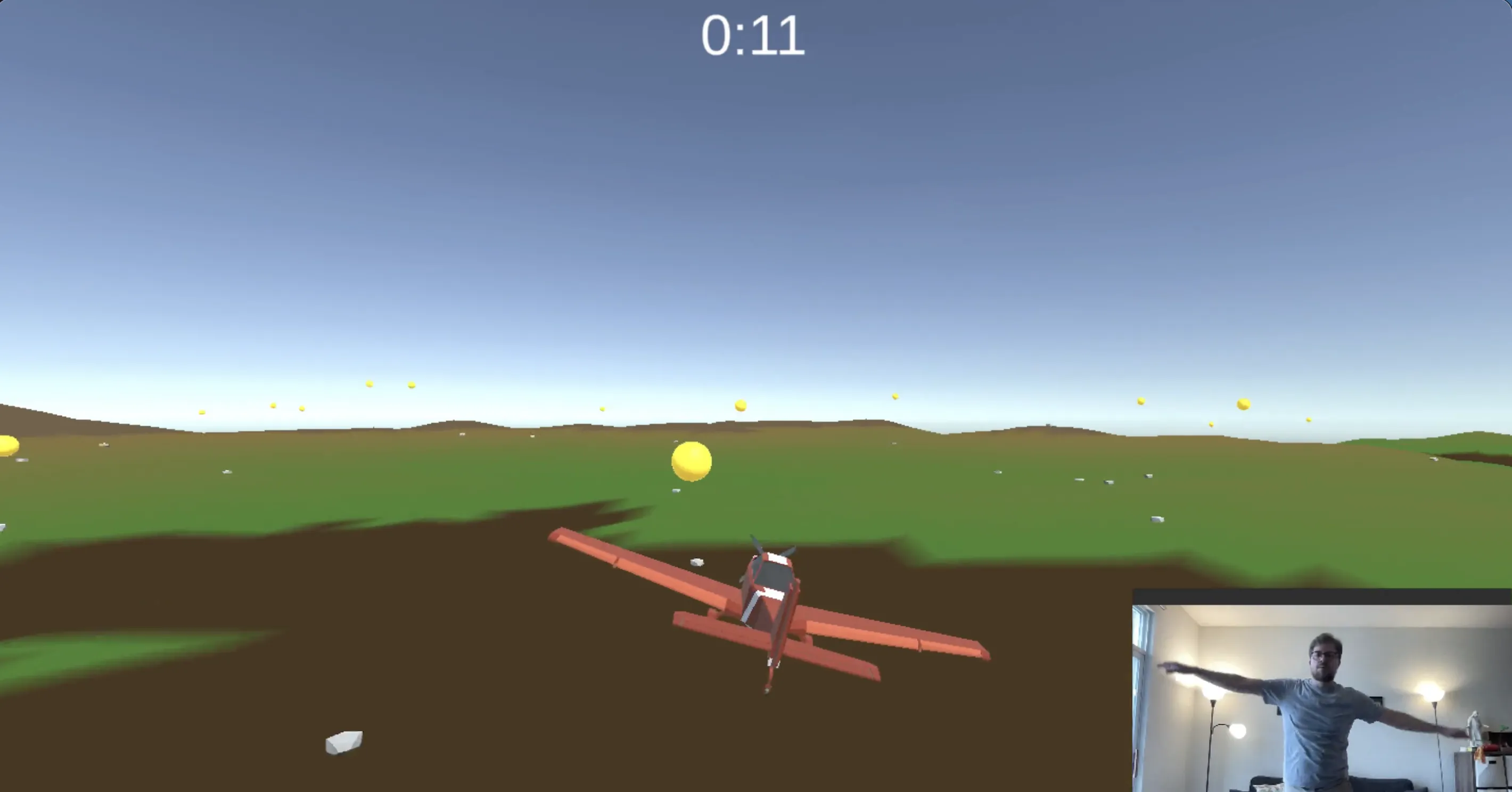
The most unnatural pose in Project 8 was the T-Pose (arms straight out at shoulder height). While I was doing it, it felt much more like I should be flying than triggering a windstorm. I rather liked that idea, and decided to build a game where a player could use their arms to fly.
This also used pose detection, like in Project 8, but with options that felt more intuitive: arms at the side to fly, lean left/right to turn left/right, and move arms up/down to go up/down. I wanted to present this one at an AI showcase at my school, so I turned it into a game: collect as many spheres as you can within a time limit.
I also had Claude write a script to automatically generate an infinite landscape, and I gave it models to use for landscaping elements to make it more visually interesting (trees, rocks, bushes, etc.).
Playing this game is surprisingly intuitive. Within a couple minutes, I felt like I'd gotten pretty good at flying the airplane, and my scores were decent. And, more than that, it was fun—I stopped thinking about the technology behind it, and I lost myself in trying to help my little plane collect some spheres.
If you'd like to play Updraft, you can download it here (currently only available for Mac with Apple Silicon):

|
Are you a part of the museum industry, a fellow founder, or want to chat?