Delve
As a Dungeons & Dragons player, I like to organize my notes spatially. I couldn't find a free tool to do that, so I built one.
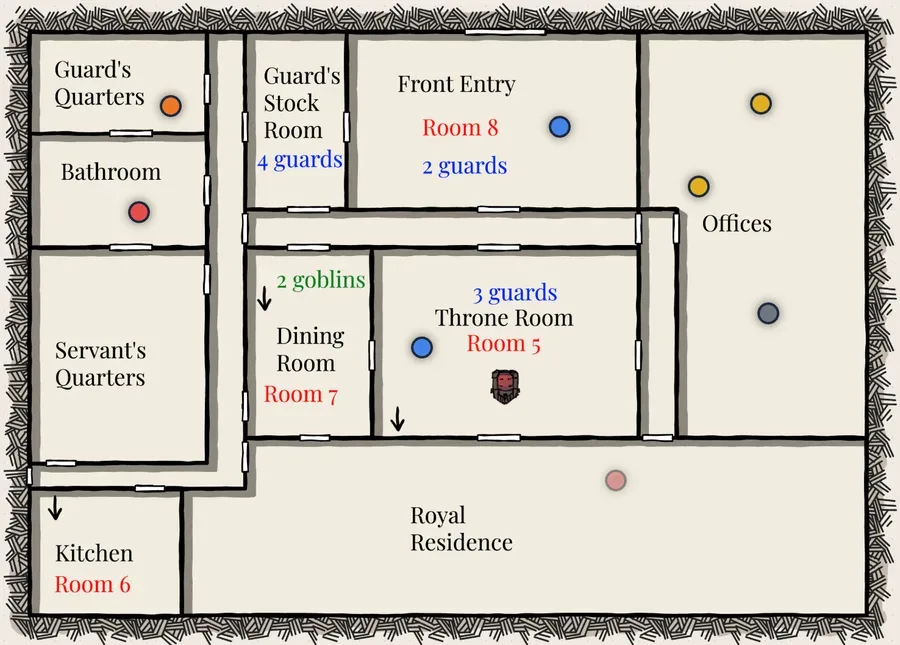
Dungeons & Dragons (D&D) is a tabletop role-playing game where players assume the role of characters in a story written by the Dungeon Master (or DM). The DM creates a world for these players, populating it with friends, foes, traps, and treasure, and the players decide how their characters navigate this world.
I've been playing D&D since 2018, and I typically play as the Dungeon Master. When I create worlds for my players, I like to have my notes organized spatially, so that whenever a player walks into a room I know what they're going to find.
Historically, I achieved this by drawing a map, labeling each important room on the map, and writing about it in my notes. You can see this in the image above—this is a map from a past game where I labeled the room numbers in red, which paired with a multi-page Google Doc with information about each room.
Under this system, I spent a lot of time in both prep and gameplay going back and forth between my maps and my notes. It worked, but it was messy.
I created Delve to remove that friction. I upload my maps to Delve, then I create my notes directly on the map as color-coordinated dots, which I can hover over for basic info (e.g. to see that a point is a goblin) and click on for advanced info (e.g. to see how much health the goblin has, or that the goblin is afraid of whistling). Delve has reusable stat-blocks, so I don't have to type in basic goblin info every time I create a goblin.
So far, I'm using Delve for my ongoing D&D campaign. It's shortened my planning time and streamlined play time, and I now have a list of features I want to add.
Because of how I'm hosting this website, I'm unable to publish Delve for live use. If you're interested in using it, feel free to download the source code from GitHub here and run it on your device!